 SiliconForge
Simulate and inspect waveforms
Applies to SiliconForge 0.1.2 · Updated . Check platform limits.
Before this task: Run the initial reset and stall test →
A simulation is an executable question. Preserve its stimulus, checker and waveform so a failure can be reproduced rather than explained away.
Prepare the DUT and testbench
You need a known design-under-test (DUT), its top/parameters/includes, a compatible simulator and a testbench with explicit expected behavior. A Python cocotb test also needs the matching Python/runtime integration. Begin with the complete source and commands in your first RTL project; it is a small directed test, not exhaustive verification.
Run a meaningful simulation
- Write the requirement before the stimulus. For a ready/valid register: accepted data must appear once in order, reset clears output valid, and stalled output remains stable.
- Set clock, reset and initial input values explicitly. Drive inputs away from the sampling edge so the test does not depend on a simulator race.
- Compile with the intended testbench top and source list. Inspect compiler errors and warnings before running the simulation.
- Enable waveform dumping in the testbench when required. The first-project example uses
$dumpfile("stream.vcd")and$dumpvars. - Run the test and inspect both the exit status and assertion results. Through a configured application flow, open the run's retained artifact from Verify; a standalone shell run remains external evidence until a supported workflow records it.
Expected result: the directed scenario either reports its expected PASS marker or stops with a specific failing assertion. A simulator exiting because the test never ran is not a pass.
Worked exercise: consecutive traffic, a long stall and reset
Keep the exact stream_register.sv from the first project. Save this second testbench as tb_traffic.sv beside it. It uses the same 8-bit module, no additional libraries and no provider request. Select its top explicitly so the earlier tb does not also run.
`timescale 1ns/1ps
module tb_traffic;
  logic clk = 0, rst = 1;
  logic [7:0] in_data = 0, out_data;
  logic in_valid = 0, in_ready, out_valid, out_ready = 0;
  stream_register dut(.*);
  always #5 clk = !clk;
  initial begin
    $dumpfile("stream-traffic.vcd");
    $dumpvars(0, tb_traffic);
    repeat (2) @(posedge clk);
    #1;
    if (out_valid !== 0) $fatal(1, "initial reset did not clear valid");
    @(negedge clk);
    rst = 0; out_ready = 1; in_valid = 1; in_data = 8'h10;
    for (int i = 0; i < 4; i++) begin
      @(posedge clk); #1;
      if (out_valid !== 1 || out_data !== (8'h10 + i))
        $fatal(1, "consecutive transfer %0d missing or out of order", i);
      @(negedge clk);
      in_data = 8'h11 + i;
    end
    out_ready = 0; in_data = 8'h99;
    repeat (8) begin
      @(posedge clk); #1;
      if (out_valid !== 1 || out_data !== 8'h13 || in_ready !== 0)
        $fatal(1, "pending output changed during long stall");
    end
    @(negedge clk); rst = 1;
    @(posedge clk); #1;
    if (out_valid !== 0) $fatal(1, "reset did not discard pending output");
    @(negedge clk); rst = 0; in_valid = 0; out_ready = 1;
    @(posedge clk); #1;
    if (out_valid !== 0) $fatal(1, "discarded output reappeared after reset");
    $display("PASS: consecutive traffic, long stall and pending reset");
    $finish;
  end
endmodule
iverilog -g2012 -s tb_traffic -o traffic.vvp stream_register.sv tb_traffic.sv
vvp traffic.vvp
Run the simulator only after a successful compile. Expect exit status 0, PASS: consecutive traffic, long stall and pending reset, and stream-traffic.vcd. This checks consecutive refills, eight stalled cycles and synchronous reset while an output is pending. It is still a directed test of one 8-bit configuration, not a randomized scoreboard, exhaustive protocol proof or timing sign-off.
| Interval | Expected observation | Why it matters |
|---|---|---|
| Four consecutive driven bytes | Registered output progresses through 0x10, 0x11, 0x12, 0x13 on successive active clock edges. | The stage can be consumed and refilled without inserting an empty cycle. |
| Eight clocks with output not-ready | Output remains valid with 0x13 and input ready is low, despite input data 0x99. | Unaccepted input must not overwrite a pending transfer. |
| Reset asserted while stalled | Output valid clears at the next rising edge and stays clear after reset is released with input invalid. | This contract discards pending data on reset; it does not promise lossless delivery across reset. |
Use a failure to locate the cause
In a separate disposable copy, change assign in_ready = !out_valid || out_ready; to assign in_ready = 1'b1;. Compile and run the traffic test again without changing its checks. Expect a nonzero exit status and pending output changed during long stall: the unaccepted 0x99 overwrites the stalled output. Restore the original expression, rebuild and confirm the test passes. If it does not fail, check that you rebuilt the modified file and selected tb_traffic.
Write down the first failing requirement, not merely “simulation red.” Preserve the failing RTL and diagnostic separately from the corrected run. This makes the repair reviewable and prevents a later green trace from erasing why the change was needed.
Inspect a bounded waveform window
- Open the trace associated with the run you are investigating. Read its provenance and timescale before interpreting values.
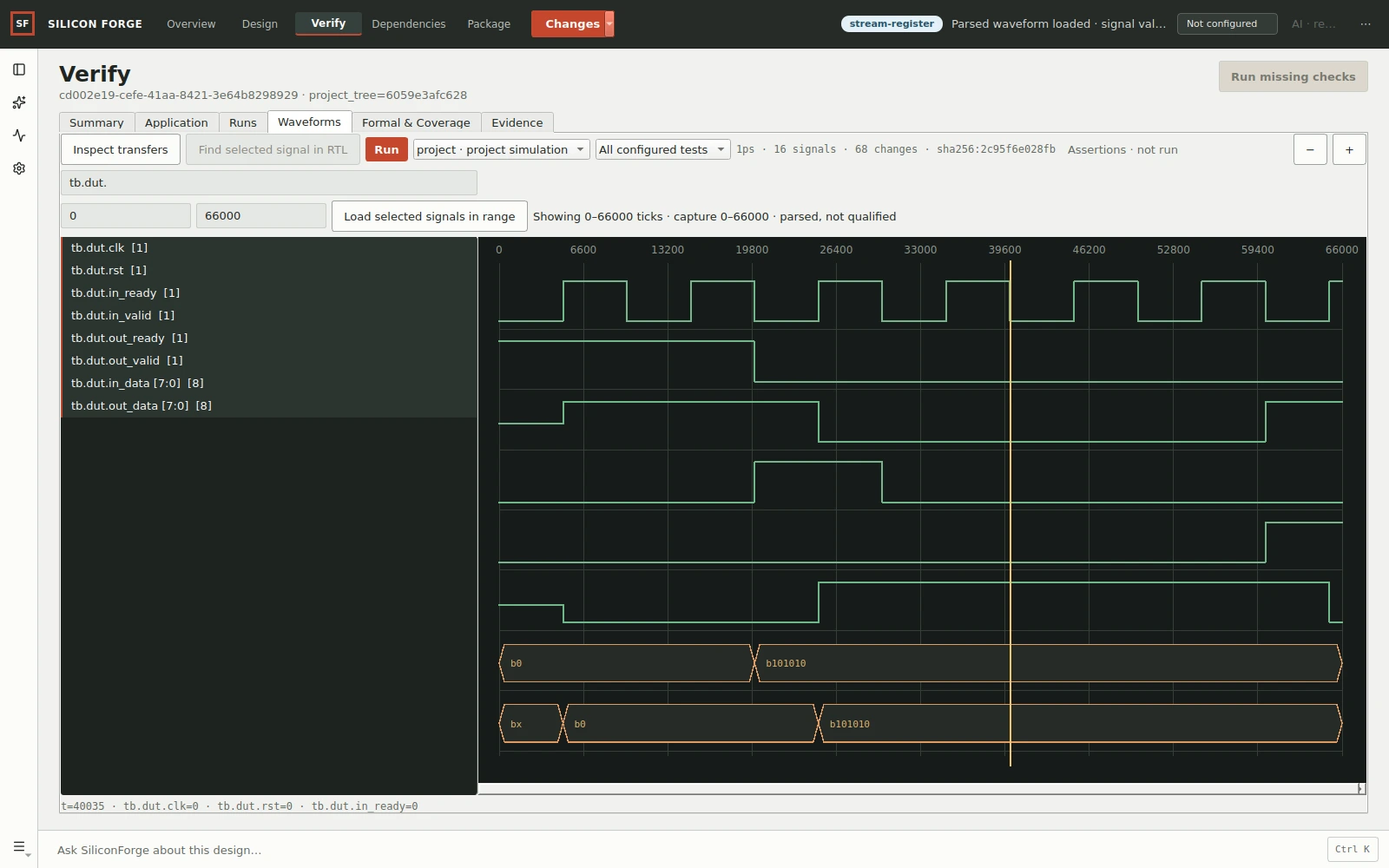
- In the native waveform workbench, use Find signal… to locate clock, reset, valid, ready and data.
- Select the required signals and enter a narrow range around the failure in Start tick and End tick. These fields use trace ticks, not an assumed nanosecond unit; read the trace timescale first. Choose Load selected signals in range; avoid requesting every signal across an entire long run.
- Click the timeline to inspect sampled values. Compare the last accepted transfer with the first unexpected result.
- Use Find selected signal in RTL for a supported source cross-probe. Inspect transfers is available for supported protocol interpretation; it does not infer every custom protocol.
For the first-project stall scenario, inspect the interval after out_valid rises and before out_ready rises. out_data must remain the accepted byte throughout that interval. Confirm the property in source and the test, not only by visually spotting a plausible waveform.
VCD, FST and missing traces
VCD and FST are trace formats, not proof formats. FST conversion/indexed access needs its corresponding verified helper. Successful simulation does not guarantee a trace was enabled or retained. If no trace exists, check the testbench dump commands, simulator output, artifact path and retention result before rerunning. Do not rename an FST file to VCD.
Debug the right failure
- Unknown module or include
- Check source ordering and build inputs, not the expected output.
- Timeout
- Check whether reset was released, clocks are running and the test is waiting for an impossible handshake. Preserve the timeout and last trace window.
- Assertion mismatch
- Compare the contract, stimulus and DUT. Do not change the expected value merely to match the implementation.
- Unavailable or stale waveform
- Use the exact run artifact. If source/trace bindings changed, load a current trace rather than accepting stale data.
Extend coverage with long stalls, consecutive transfers, reset during traffic and parameter variants. Related: evidence interpretation, formal properties, application workloads.
Need help? Report an issue. Include your application version; never include credentials.